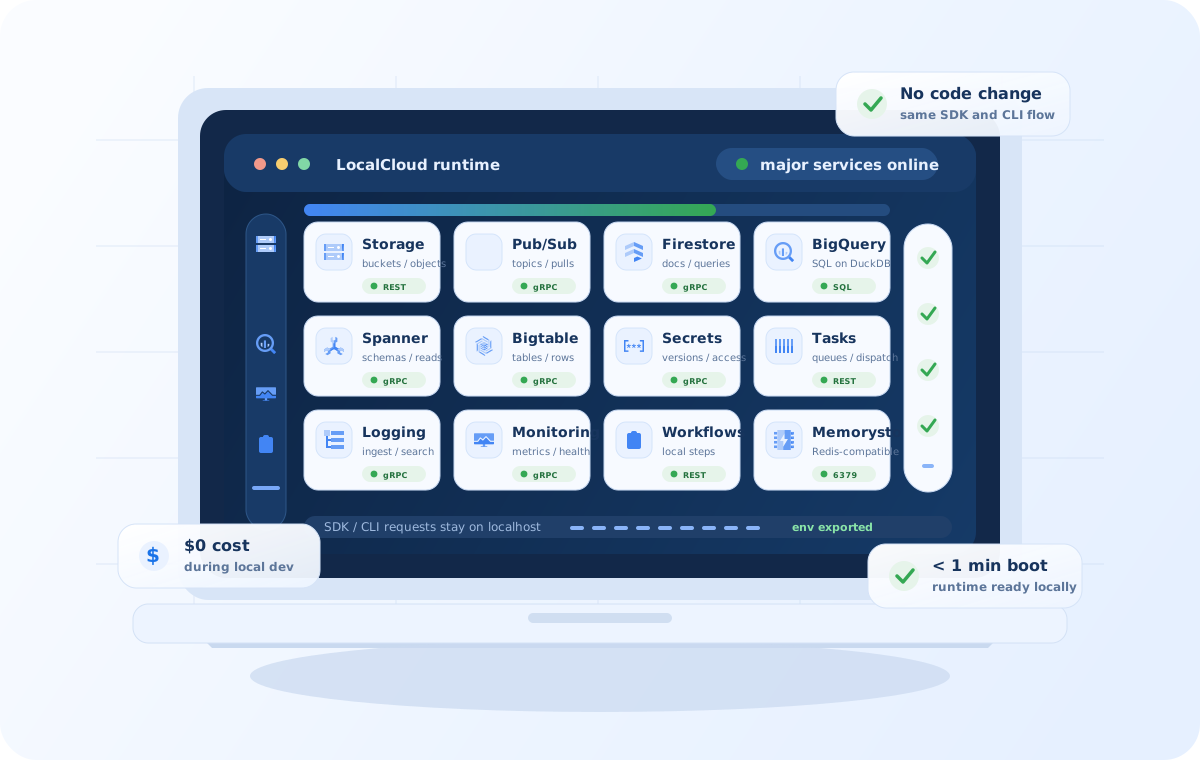
Core Google Cloud services

Google Cloud In-a-Box.

Run most Google cloud services on your laptop.

Same SDK and CLI works without any code change.

  • 1
    Docker container
    No cloud account or access required for the team
  • $0
    cloud spend during dev / iteration
    stay local until the team is ready
A laptop showing LocalCloud services running inside the screen, with real Google Cloud service icons, readiness panels, and badges for no code changes and zero cloud cost.
Quick Start

Quick Start LocalCloud in less than 1 minute.

  1. 01 Pull & Run the docker image.
  2. 02 Open the console, check service health.
  3. 03 Point your SDK to localhost. Refer to the user guide on the console for all service environment variables, then make your first API call.
docker pull jaysen2apache/localcloud

mkdir -p ~/.localcloud/data

docker run -d \
  -p 8080:8080 -p 4443:4443 \
  -p 8085-8087:8085-8087 \
  -p 9010:9010 -p 9050:9050 -p 6379:6379 \
  -m 4g --name localcloud \
  -v ~/.localcloud/data:/var/lib/localcloud \
  jaysen2apache/localcloud

eval "$(curl -s localhost:8080/_localcloud/env?format=shell)"
Zero Code Changes Use the same Google Cloud SDKs and CLI, redirect them to local with ENV variables.
Fast Development & Testing Stay local while you shape the app, then switch back to shared Google Cloud environments when you are ready.
Operational Visibility Console, health, env export, and seeded sample data make the runtime inspectable immediately.
Service Catalog

LocalCloud Services:

Databases

Transactional, document, wide-column, and cache-style data services for app backends.

Continue Exploring

Run All Cloud Services locally for faster & cheaper development & testing.

The homepage tells you what LocalCloud is. The docs and service pages explain how to use it, what each service supports, and where the runtime boundaries are.